Deutsch
 Español
 Français
 lingua italiana
 ไทย
 Tiếng Việt
 العربية
 한국어
 Pусский




MICRON · SELF-SERVICE EQUIPMENT RENTAL
Make paddle board rental easier to access
Plan a SUP board rental vending machine for a beach, lakeside venue or resort. Customers select equipment on the touchscreen, review the rental rules, pay by card and keep an order code for return.
- Guide customers through separate Rent and Return screens.
- Match storage compartments to your boards, bags and accessories.
- Manage supported product, pricing and operating settings remotely.
Build the station around your rental equipment
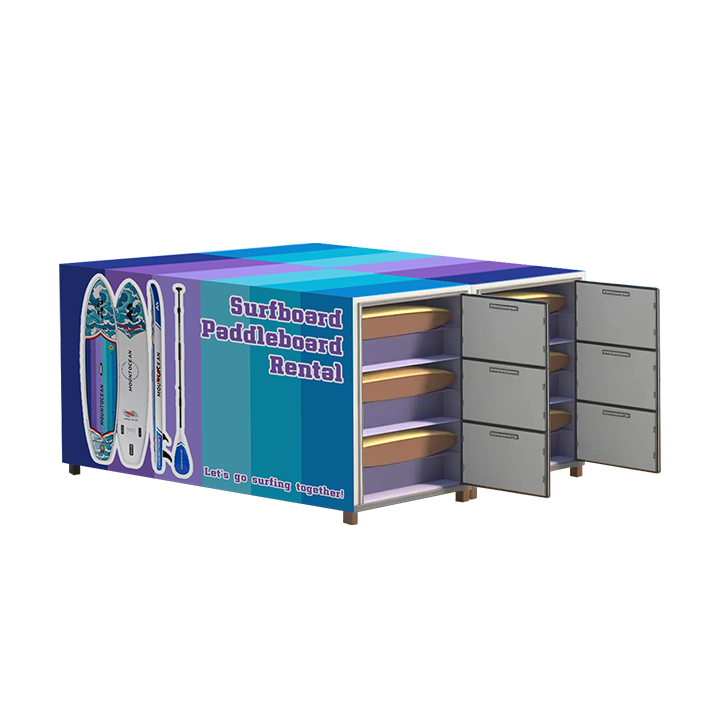
A paddle board vending machine connects equipment storage with a self-service rental workflow. Start with the board type and the way it will be stored: a full-length board and a packed inflatable kit require different compartments and loading access.

Boards and packed kits
Provide board length, width, thickness and weight, or the packed bag dimensions for an inflatable kit. Confirm clearance for fins, handles and safe removal.
Paddles and accessories
List paddles, pumps, fins, bags and other items included in each rental. Decide whether they share a compartment or need separate storage.
A controller can serve multiple compatible cabinets. The illustrated layouts show several compartment styles; the number of cabinets, usable capacity and supported expansion must be specified for your project.

How customers rent and return a SUP board
1. Select Rent
Choose the equipment on the touchscreen and open its product details. Show a clear equipment description so customers know what their rental includes.
2. Review the charges
Customers check the rental duration, billing rules and any deposit shown before proceeding. Set the commercial rules for your venue and confirm payment-provider support.
3. Pay and collect
The illustrated workflow uses a card payment before collection. Customers take out the equipment and record the order code; a receipt can be printed when the selected configuration includes a printer.
4. Return with the order code
Choose Return, enter the order code, place the equipment in its original locker and close the door as instructed. Demonstrate the final return and billing confirmation before launch.

Define the return procedure for the complete kit, including paddles and accessories. Arrange staff checks for missing, wet or damaged equipment; a closed locker door alone does not establish the condition or completeness of a returned board.
Manage the rental point between site visits
Equipment listings and prices
Maintain product information and supported price settings remotely. Keep the touchscreen descriptions consistent with the equipment loaded into each compartment.
Activity and operating records
Review supported transaction reports, inventory information and operation records. Use these records to plan inspections and investigate a customer’s rental or return question.
Machine alerts
Check available machine-error notifications and identify who will respond. Confirm the alert channels and remote troubleshooting functions included in your software package.
Schedules and staff access
Supported management tools include business hours, advertising and subaccounts. Configure access around the venue’s operating plan and confirm the modules provided with your system.

Ask for a demonstration using your rental rules, payment method and equipment layout. Confirm how active rentals, completed returns, deposits and exceptions are displayed; available functions depend on the selected software and payment configuration.
Configuration details to agree before ordering
| Product model | SUP Board Rental Vending Machine |
|---|---|
| Customer interface | Touchscreen with Rent and Return workflow |
| Payment workflow | Card payment illustrated; confirm terminal, currency and local acquiring support. |
| Return method | Order code and return to the original locker, following the screen prompts. |
| Cabinet layout | Multiple compatible cabinets can share a controller; agree compartment dimensions and equipment capacity. |
| Equipment fit | Full-length boards or packed inflatable kits require the appropriate storage layout; confirm samples and drawings. |
| Site services | Confirm electrical supply, network connection, anchoring, access space and outdoor protection for the proposed location. |
| Reference price | US$4,299–5,725 listed; request a current configuration-specific quotation. |
Send a site photo or layout, delivery country, equipment dimensions and desired number of rental kits. Request an installation drawing with the final footprint, weight, door clearance, power and network requirements. Agree printer options, branding and all supplied equipment in the quotation.
Plan collection, return and daily checks
Place the rental point where customers can read the instructions and handle a board without blocking a walkway. For a beach or lakeside site, discuss rain, salt spray, sand, sunlight, drainage and seasonal storage when selecting the enclosure and installation method.
Set operating hours around local conditions and your supervision plan. Assign a contact for failed payments, lost order codes and return problems, and plan regular equipment cleaning, drying and inspection.


For a project specifically requiring solar power, compare the solar-powered paddle board rental solution and confirm its separate configuration.
SUP board rental vending machine FAQ
Is this a SUP rental station or a machine that sells boards?
This page focuses on self-service rental. The touchscreen workflow provides Rent and Return options, card payment and an order code for returning equipment. Define the rental terms and return procedure for your venue before launch.
Can it hold full-length boards and inflatable SUP kits?
The compartment layout must match how your equipment is stored. Send dimensions and photos of the full-length board or packed inflatable kit, including accessories. Confirm usable space and loading clearance with a drawing and sample fit check.
How many boards can one station hold?
Capacity depends on the compartment size, cabinet count and equipment arrangement. A controller can serve multiple compatible cabinets, but the supported combination and number of complete rental kits must be agreed for your project.
How does a customer rent a board?
The customer selects Rent, chooses equipment, reviews its details and billing rules, then follows the card-payment instructions. After collection, the customer keeps the order code for the return. Receipt printing depends on the installed printer configuration.
How is the board returned?
The customer selects Return and enters the order code, then places the equipment in the original locker and closes the door as instructed. Confirm the final on-screen return confirmation and how the rental charge is completed during the demonstration.
Can I set rental rates and a deposit?
The illustrated rental screen displays time-based billing rules and a deposit. Agree the supported rate structure, deposit handling and payment-provider requirements before purchase. The example prices in the screen illustration are not a recommended tariff for your business.
Are deposits automatically refunded immediately?
Confirm whether the selected payment setup uses a charge, preauthorization or another method, and how the return affects settlement or release. Timing and refund handling depend on the payment provider and agreed configuration; request a demonstration of the complete flow.
What happens if an accessory is missing or a board is damaged?
Establish an equipment checklist and a staff inspection procedure. Agree how exceptions are handled before reopening the equipment for rental. Do not rely on locker closure alone to confirm that every item has been returned undamaged.
Can staff manage the station remotely?
Supported functions include product and price settings, transaction reports, inventory and operating records, machine-error information and business-hour settings. Confirm which rental-specific screens, alerts and account functions are included in your selected software package.
Can I install it beside the sea?
Discuss the actual exposure to rain, salt, sand and direct sunlight, plus drainage and anchoring. Confirm the enclosure specification and maintenance requirements for the location. Beach use does not mean every cabinet is suitable for every exposed coastal site.
Does this model include solar power?
Solar power is not assumed for this configuration. If mains power is unavailable, discuss the separate solar-powered paddle board rental solution and have its power system sized for your site and operating requirements.
Are paddle boards and safety accessories included?
Confirm the supplied equipment list in the quotation. Product illustrations show possible rental items and layouts; they do not establish that boards, paddles, pumps or other accessories are included in the machine price.
What does the station cost?
The listed reference price is US$4,299–5,725. Request a current quotation specifying the cabinet layout, payment terminal, printer, software and delivery destination. Confirm freight, taxes, installation and any service charges separately.
What maintenance and support should I arrange?
Plan cleaning, drying and inspection of equipment, plus checks of locks, doors, touchscreen and payment terminal. Request the maintenance instructions, spare-parts options and the support and warranty terms for your order.
What should I send for a configuration proposal?
Provide your delivery country and venue, site layout, board or kit dimensions, required quantity, payment preferences and intended rental and return rules. Ask for a demonstration covering a normal rental, completed return and a customer-support exception.
Plan your self-service paddle board rental point
Share your equipment dimensions, venue and rental rules. Request a cabinet layout, configuration quotation and a demonstration of the rent-and-return workflow.
Discuss my SUP rental projectSend Message
Related Products